The short version
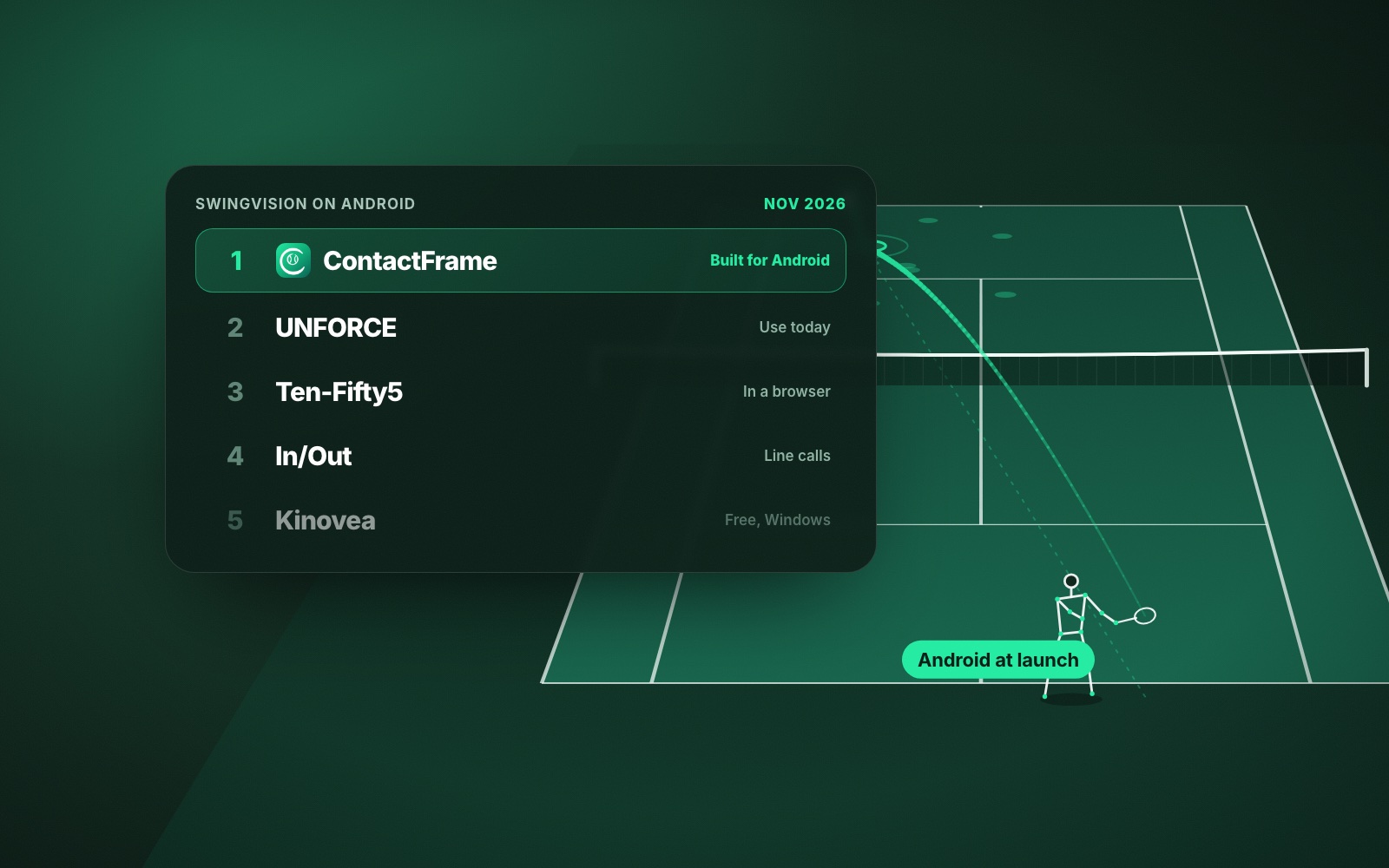
- There is no SwingVision Android app. Its FAQ says it is working with Google, with no release date.
- ContactFrame is built for Android and iOS at launch, with speed, spin, placement, movement and, on Pro, swing mechanics. Join the list.
- On Android today, UNFORCE has an Android app and Ten-Fifty5 works in any browser.
- In/Out pairs a net-post device with an Android app, and Kinovea is free on a Windows PC.
- Buying a second-generation iPhone SE, used only as a tennis camera, is SwingVision’s own suggested workaround.
You have an Android phone, you have read about SwingVision, and you have found it is not in the Play Store. SwingVision for Android does not exist yet, and there is no date for it. This guide sets out exactly what SwingVision says, then ranks the tennis video options that work for an Android owner today or soon.
We make ContactFrame, so weigh our top pick accordingly. Everything we say about the other products comes from their own websites and app store pages, checked in November 2026. Prices and features change.
Is SwingVision on Android?
No. SwingVision runs on iPhone, iPad, Mac, Apple Watch and Vision Pro. Its FAQ says: “We’re working closely with Google engineers to bring SwingVision to Android.” No release date is given.
Until then, SwingVision’s own suggestions are to buy a second-generation iPhone SE to use as your tennis camera, or to film on your Android phone or a GoPro and import the footage into the SwingVision app on a Mac or iPad. Both mean owning an Apple device.
How we ranked the SwingVision Android alternatives
Every option below works for someone whose main phone runs Android. We looked at what you need to buy, what it measures, the price, and whether it is still supported. We have not tested accuracy head to head, so nothing here claims one is more accurate than another.
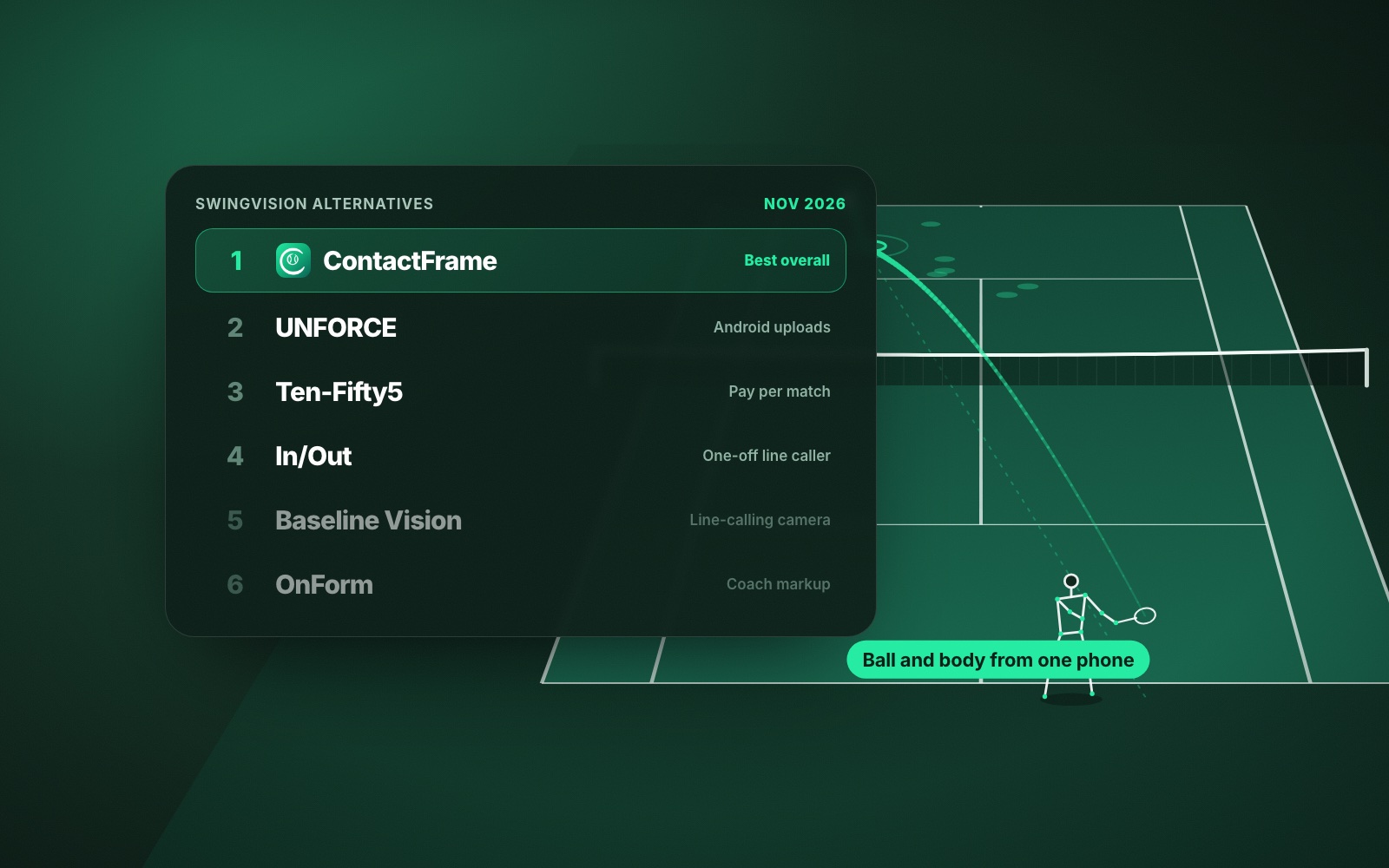
- ContactFrame: best overall for Android owners who want deep insight from one phone
- UNFORCE: best Android app you can use today
- Ten-Fifty5: best for pay-per-match singles reports in a browser
- In/Out: best for live line calls, with an Android app
- Kinovea: best free option, on a Windows PC
- A second-hand iPhone SE running SwingVision: best if you specifically want SwingVision
1. ContactFrame: best overall Android alternative to SwingVision
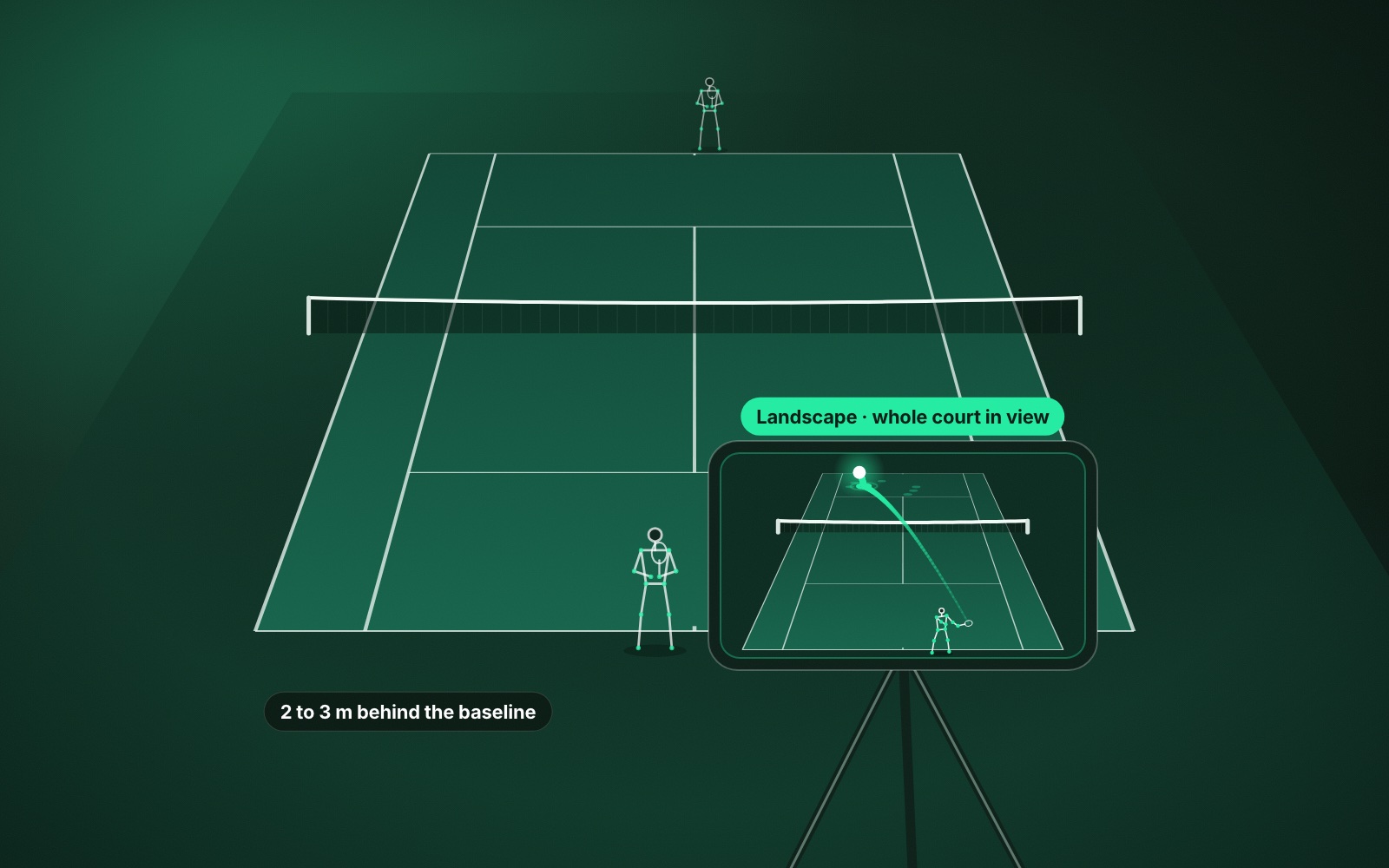
ContactFrame is built for Android and iOS at launch, so your phone is not a second-class citizen. One phone on a tripod behind the baseline gives you speed, spin (shown only when the reading is solid), bounce position and an in / out / close call for every shot, a shot quality score out of 100, rally and point breakdowns, serve placement on the deuce and ad sides, and how you moved. On Pro, it adds shot mechanics: swing scores, a stick-figure replay of each contact and one Next fix with a drill.
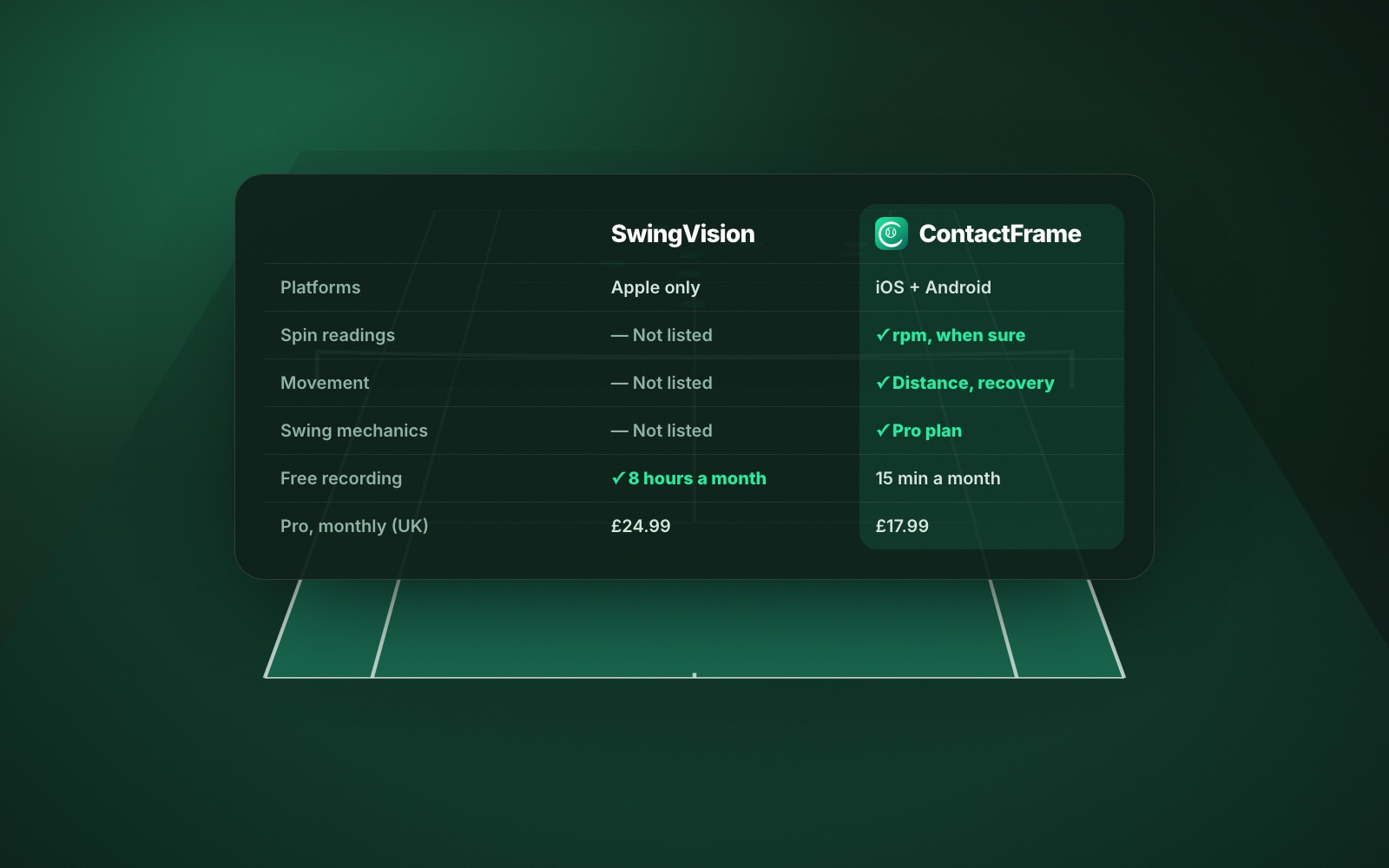
For comparison, SwingVision’s published list covers shot stats and heatmaps for speed, depth and consistency, line calls, scoring and match stats, and strategy insights; it does not list spin, movement, shot quality or swing mechanics. The full side-by-side is in SwingVision vs ContactFrame.
ContactFrame is launching on Android and iOS and cannot be downloaded yet; join the list. If you need something this week, use UNFORCE or Ten-Fifty5.
- Needs: one phone and a tripod.
- Platforms: Android and iOS at launch.
- Price (checked Nov 2026): Free £0 with 15 minutes a month; Basic £9.99 a month with unlimited recording; Pro £17.99 a month with shot mechanics. See plans.
- Good at: ball and body insight in one app, plus The Ladder for UK leagues and tournaments.
- Watch out for: not out yet; small free tier; no live streaming or doubles analysis; in/out calls are for review, not official line calling.
2. UNFORCE: best Android app available now
UNFORCE (formerly AceSense) is on Google Play and the web. You film a session on one phone, upload it, and get a summary, clips and a debrief. It covers tennis and four other racket sports, and coaches can read your debriefs free. Its iOS app is not publicly available yet. See unforce.io.
- Needs: one phone.
- Platforms: Android and web.
- Price (checked Nov 2026): Pro €19 a month or €190 a year for 20 analyses a month, videos up to 30 minutes; Team €49 a month. A 7-day Pro trial for eligible users.
- Good at: a native Android app today.
- Watch out for: euro pricing and a monthly analysis cap; its homepage does not confirm speed readings or line calls.
3. Ten-Fifty5: best browser option
Ten-Fifty5 has no app at all, which is exactly why it works on Android. Upload a singles match filmed from behind the baseline in your browser and you get a point-by-point breakdown of serve, return and rally play, shot placement and rally length.
- Needs: a phone or camera on a fence mount or tripod.
- Platforms: web.
- Price (checked Nov 2026): first match free, then $25 a match, bundles from $15 a match, $40 a month for up to 10 matches, or a $300 season pass.
- Good at: occasional match reports without a subscription.
- Watch out for: singles only; analysis after the match; US-dollar pricing.
4. In/Out: best for live line calls on Android
In/Out is a net-post device that calls lines with light and sound during play and sends full-court video to your phone, with placement maps and serve and shot speeds. Its companion app runs on Android and iOS.
- Needs: an In/Out Net Device, optional Line Devices.
- Platforms: Android and iOS.
- Price (checked Nov 2026): one-off, no recurring fee, from $299.
- Good at: calls while you play, with no subscription.
- Watch out for: extra hardware; UK shipping and pricing are not stated on its site. More in In/Out alternatives.
5. Kinovea: best free option (Windows)
Kinovea is free, open-source desktop software. Copy your Android footage to a Windows PC and you get slow motion, synchronised side-by-side comparison and angle and distance measurement. It is a manual tool, so you do the analysis yourself.
- Needs: a Windows PC.
- Platforms: Windows 7 to 11 only; not Apple Silicon Macs; no mobile app.
- Price: free.
- Good at: frame-by-frame technique study at no cost.
- Watch out for: nothing is automatic.
6. The iPhone SE workaround
If you want SwingVision specifically, its own suggestion is simple: buy a second-generation iPhone SE and use it only as your tennis camera. You keep your Android phone for everything else. Check the phone runs iOS 18 or later, which SwingVision requires.
- Needs: a second-hand iPhone SE (second generation) and a mount.
- Platforms: iOS, on the second phone.
- Price (checked Nov 2026): the cost of the phone, plus SwingVision: free with 8 recording hours a month, or Pro at £24.99 a month or £179.99 a year in the UK App Store.
- Good at: getting SwingVision, including its generous free tier, without switching phones.
- Watch out for: a second device to charge and carry, and the up-front cost.
If you already own an iPad or Mac, SwingVision’s other route needs no extra hardware: film on Android and import the footage.
Which SwingVision Android alternative should you pick?
If you can wait for launch and want the most insight from the phone you already own, ContactFrame. If you need an Android app today, UNFORCE. If you play the odd important singles match, Ten-Fifty5. If you want live calls, In/Out. If you want free and own a Windows PC, Kinovea. If it has to be SwingVision, the iPhone SE route.
Whichever you choose, the filming basics are the same: see how to record a tennis match on your phone and the best phone setup for filming tennis. For the full field, including club cameras, read SwingVision alternatives, and for wider Android picks see the best tennis apps for Android.
Common questions
Is SwingVision available on Android?
No. As of November 2026 SwingVision runs only on iPhone, iPad, Mac, Apple Watch and Vision Pro. Its FAQ says it is working closely with Google engineers on an Android version but gives no release date.
Can I use SwingVision with Android footage?
Partly. SwingVision’s FAQ says footage from an Android phone or a GoPro can be imported into its Mac or iPad app, so you still need an Apple device to analyse it.
What is the best SwingVision alternative for Android?
We think ContactFrame, because it is built for Android at launch and measures speed, spin, placement, movement and, on Pro, swing mechanics. We make it, and it is not out yet, so in the meantime UNFORCE or Ten-Fifty5 work on Android today.
Which iPhone do I need for SwingVision?
SwingVision’s FAQ asks for an iPhone 11 or newer on iOS 18 or later, or an iPad on iPadOS 18 or later. For Android owners it suggests buying a second-generation iPhone SE to use as the camera.
Is there a free tennis analysis app for Android?
ContactFrame will have a free plan with 15 minutes of recording a month, and Ten-Fifty5 analyses your first match free in a browser. Kinovea is free but runs on Windows rather than on the phone.
Built for Android from day one.
ContactFrame is launching on Android and iOS. Join the list to hear first.
See The Lab